How to Automate Localization of UGC Video Ads with AI Subtitles and Voiceovers
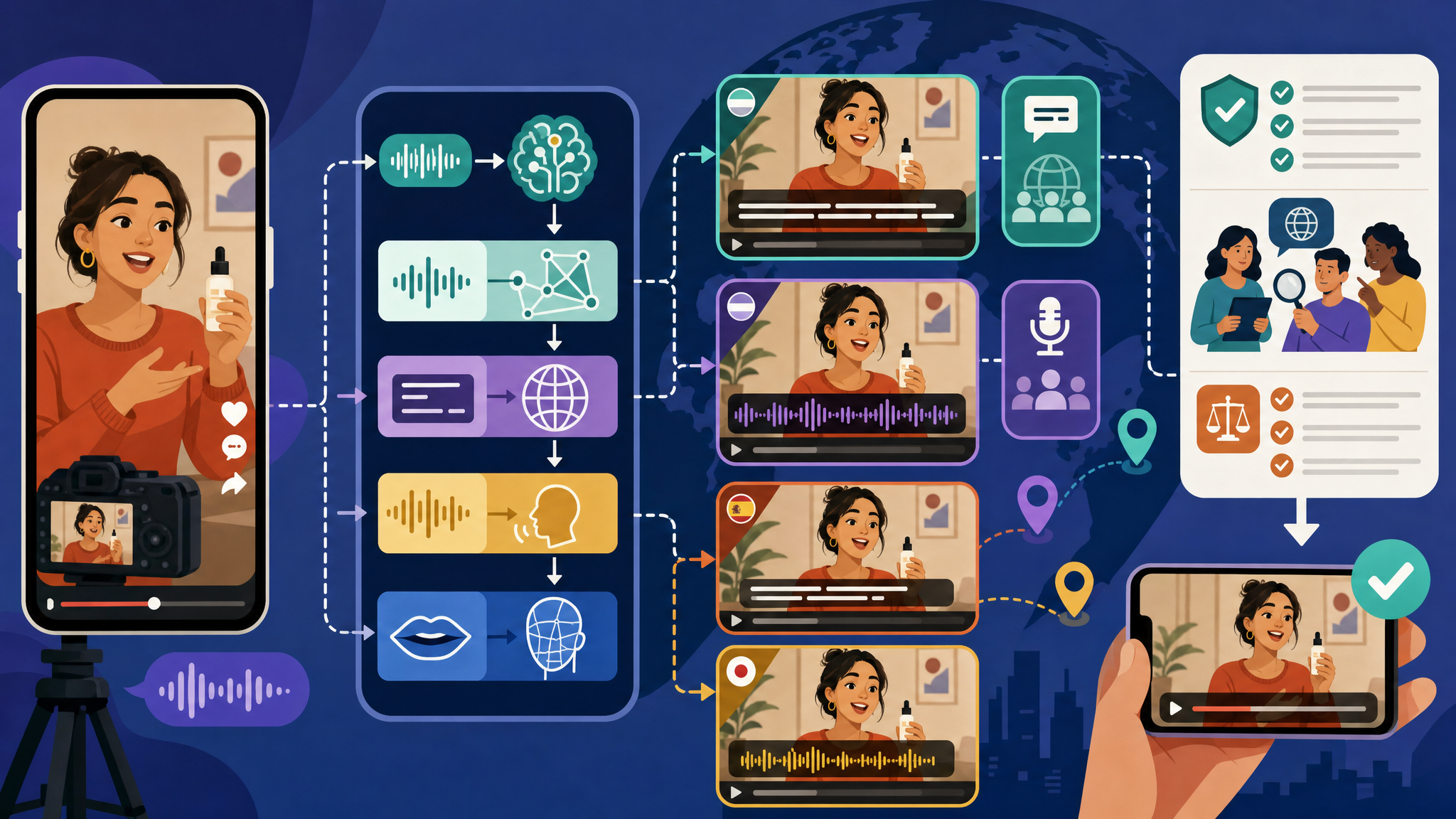
If you want to automate localization of UGC video ads, use an AI workflow that auto‑transcribes the original audio, fixes brand terms, machine‑translates the script, and then outputs timed subtitles and/or a dubbed voiceover—optionally with lip sync and voice cloning—while you adapt on‑screen text, CTAs, and cultural references for each market. Add QA and compliance checks before exporting platform‑ready aspect ratios.
What do we mean by UGC ad localization?
UGC video ads are creator‑style ads—often phone‑shot, vertical, and testimonial‑like—that mimic organic social content but run as paid ads for brands. Video localization is adapting a video so it feels native to a specific language and culture, not just translating words. For UGC ads, that typically includes subtitles, dubbing/voiceover, on‑screen text replacement, and sometimes visual or CTA changes.
Should you use subtitles or AI voiceovers for UGC ads?
Short‑form UGC ads often perform well with subtitles alone because they preserve the authenticity of the original creator’s voice. Full dubbing suits situations where immersion and a seamless language experience are prioritized, especially in performance‑focused paid placements. Here’s a quick comparison:
| Option | What it does | When it shines | Key considerations |
|---|---|---|---|
| Translated subtitles (keep original audio) | Auto‑transcribe, translate, and display time‑coded captions | Mobile‑first, creator‑led ads where authenticity matters | Format for small screens; choose burned‑in vs caption files |
| AI dubbed voiceover (replace/overlay audio) | Translate, synthesize a new voice, align timing; some tools add lip sync | When you want fully localized audio and higher immersion | Match pacing/emotion; consider voice cloning for consistency |
How does AI automate localization end‑to‑end?
Modern platforms combine automatic speech recognition (ASR), machine translation, subtitle timing, text‑to‑speech (TTS), and—in some cases—lip syncing and voice cloning in a single workflow. Specialized video translation systems can automatically translate, synthesize voices, and sync lips for UGC ads, which significantly reduces manual editing time. Some ad‑focused platforms also provide multilingual support to generate localized UGC videos from one base creative and return multiple language versions in bulk.
What’s a proven workflow to automate AI subtitles?
For UGC ads on TikTok, Reels, and Shorts, an effective subtitle pipeline is:
- Auto‑transcribe with ASR.
- Manually fix obvious errors first—especially brand/product names and domain terms—so mistakes don’t propagate into every language.
- Machine‑translate the corrected transcript.
- Generate time‑coded subtitles.
- Export as SRT/ASS or burn them into the video.
Mobile‑first formatting tips: keep subtitles to two lines where possible, limit line length for small screens, and sync tightly with fast cuts to protect readability and watch time. Some subtitle generators claim up to around 99% accuracy in ideal conditions, but you should still review and edit before publishing.
Burned‑in vs closed captions:
- Burned‑in (open): Always visible on any platform.
- Caption files (closed): Viewers can toggle them and they can be indexed for accessibility.
How do you automate AI dubbing for UGC?
AI dubbing platforms can translate, synthesize a new voice, and align timing automatically, making it possible to localize into multiple languages in minutes without re‑recording. Recommended practice is to match the original pacing and emotional tone so lines line up with on‑screen actions and expressions. Many tools support voice cloning or custom voice profiles to keep the voiceover consistent with the creator or brand across languages. Some systems add lip‑sync adjustments so mouth movements better match the new audio.
How should you localize on‑screen text, offers, and CTAs?
Localization often goes beyond dialogue:
- Replace or re‑animate overlays and app UI text in the target language while preserving timing and animation.
- Adapt currency, dates, units, legal phrasing, and CTAs to the local market.
- Rewrite slang, memes, or local references so the message lands culturally—not just linguistically.
Can AI also localize visuals and on‑screen talent?
Advanced ad platforms can regenerate localized visual variants by changing digital actors, backgrounds, or locations to fit each region while keeping the original script and structure. In some workflows, creators build a digital actor (using 20+ reference photos) so the same persona can be reused across markets; the AI keeps facial features locked while updating audio and lip movements for each language. Some AI agents can take a finished master ad, propose a localization plan for a new market, regenerate region‑appropriate character and location references, translate on‑screen UI text, and output new localized clips. These agents can also create translated, lip‑synced voiceovers that mirror the tone of the original.
How fast can automated localization be?
AI‑driven workflows can reduce turnaround dramatically. Some systems describe end‑to‑end localization—visual tweaks, translated and lip‑synced audio, and reassembled edits—into a new market in roughly a couple of hours instead of days or weeks with manual methods.
How do you scale for multi‑platform delivery?
- Export multiple aspect ratios from a localized master: 9:16 for TikTok/Reels/Shorts and 1:1 or 4:5 for feeds.
- Use tools that handle resizing and safe‑area adjustments automatically or semi‑automatically.
- Many platforms let you upload one master ad, choose multiple languages, and receive localized versions in bulk—subtitles and/or dubbed outputs already synced.
What QA and compliance steps are essential?
- Translation review: Check terminology, tone (informal vs formal “you”), and cultural references.
- Sync and readability: Verify subtitle timing, line length, and visibility on mobile; confirm voiceover alignment and lip sync.
- On‑screen text: Confirm all overlays/UI, prices, and offers are correct.
- Brand voice: Use glossaries, tone instructions, and approval workflows to keep messaging consistent across languages.
- Legal/compliance: Ensure local advertising and endorsement rules are met. Secure explicit creator consent for synthetic voice use.
How should marketers test and iterate?
For global campaigns, start by localizing a small set (e.g., 3–5) of top‑performing base ads and test them in a few target markets. A/B test variables like the hook, CTA, and caption style while holding other elements constant. Compare hold rates, click‑through rates (CTR), and conversion metrics across languages to refine your approach.
A practical end‑to‑end checklist
- Choose base creative(s) and target markets.
- Run ASR on the original audio; fix brand and jargon terms.
- Machine‑translate; apply tone/glossary rules.
- Generate subtitles; format for mobile; pick burned‑in vs caption files.
- Optionally synthesize dubbed voiceovers; match pacing/emotion; consider voice cloning and lip sync.
- Replace localized on‑screen text/UI; adapt currency, dates, units, legal lines, and CTAs.
- Export platform‑ready aspect ratios; generate bulk language variants.
- QA pass for translation, sync, visuals, brand voice, and compliance; secure creator consent for synthetic voice use.
- Launch, A/B test, and iterate based on performance data.
How do you choose the right tools (vendor‑neutral)?
- Integrated subtitle + dubbing: Some platforms bundle ASR, translation, TTS, and lip sync in one place to avoid file handoffs.
- Enterprise dubbing: Options exist with human‑in‑the‑loop review and ad‑quality audio for large‑scale campaigns.
- Subtitle‑first: Budget‑friendly tools focus on accurate translated captions and basic voices.
- UGC/localized ad platforms: Some are built for multilingual UGC generation, letting you upload one master and get multiple localized outputs with subtitles and natural‑sounding voiceovers.
- AI‑first production: Certain systems support multilingual generation from the script stage, including AI actors and region‑specific visual variants.
Frequently asked questions
- Do I need dubbing, or are subtitles enough for UGC ads?
- For short‑form, creator‑style ads, subtitles often perform well because they preserve the original voice. Choose dubbing when you want a fully localized listening experience and seamless immersion, especially in performance‑focused placements.
- What’s the best way to format subtitles for TikTok, Reels, or Shorts?
- Keep captions to two lines, use concise line lengths for small screens, and sync tightly with quick cuts. Decide between burned‑in subtitles for guaranteed visibility or closed captions that viewers can toggle and that can be indexed for accessibility.
- How long does AI localization take compared to manual methods?
- AI workflows that combine transcription, translation, dubbing, and lip sync can localize a UGC ad for a new market in roughly a couple of hours, whereas manual processes can take days or weeks.
- What legal or consent steps should I consider when using AI voiceovers?
- Secure explicit creator consent for synthetic voice use and verify that your ad follows local advertising and endorsement regulations in each target market.