How to Use AI Avatars and Voiceover to Create UGC‑Style Ads Without Real Creators
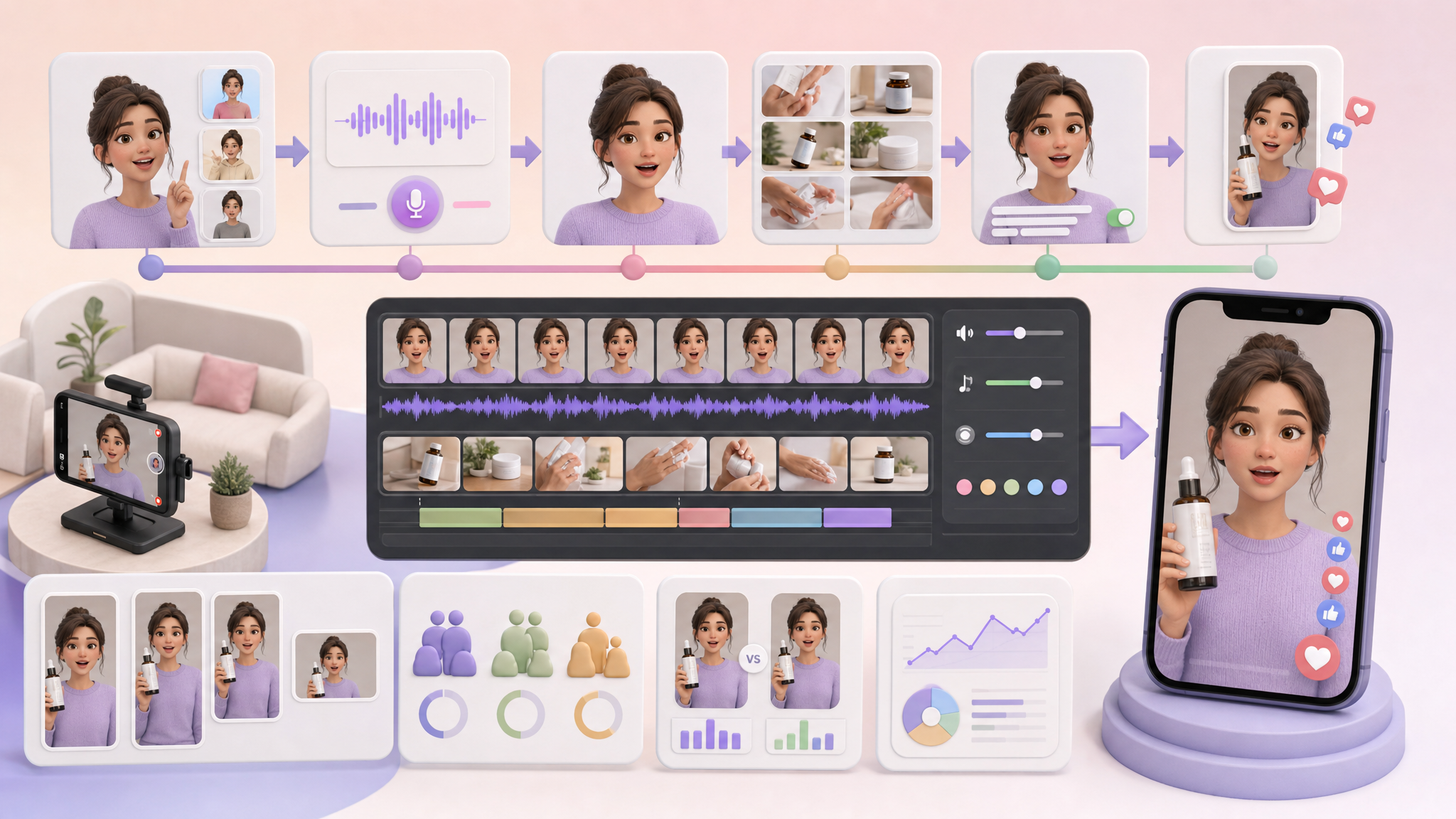
If you want UGC‑style ads without hiring real creators, use an AI UGC workflow: write a hook‑led script, upload your product assets, pick an AI avatar and voiceover, generate a storyboard, produce the video, refine lip‑sync and pacing, and export in platform‑native aspect ratios (especially vertical 9:16 for short‑form). The big advantage is speed and scale—ads that look like creator content without creator contracts or studio shoots.
What are AI UGC ads?
AI UGC ads are creator‑style video ads generated with AI avatars, voiceovers, and video tools instead of hiring real influencers or film crews. The promise is rapid production at scale so you can launch native‑feeling social ads faster and without large production teams.
What’s the proven workflow to produce them?
A commonly used workflow looks like this:
- Define the hook and write the script.
- Upload product assets (images, logos, claims you plan to feature).
- Choose an AI avatar or a visual style.
- Generate a storyboard or shot sequence.
- Produce the video inside the tool.
- Review each scene, especially lip‑sync and pacing.
- Export in platform‑native aspect ratios (vertical, square, or landscape as needed).
How should the script be structured?
Strong UGC‑style ads typically follow this clear structure:
- Hook: something visually unusual or unexpected to stop the scroll.
- Problem: the pain point or situation.
- Solution: your product presented by the avatar.
- Unique selling points: a few sharp, specific reasons.
- Call to action: what to do next.
Many creators recommend testing multiple hooks before changing other elements. That keeps your learning focused on the moment that stops the scroll.
Which avatar and voiceover options can you use?
Some tools let you pick from large avatar libraries or create custom avatars from a photo or a text description. Reported options include 1,100+ ready‑made avatars and custom avatar generation. Several platforms support multilingual output, with reported coverage of 175+ languages and dialects.
For voice, tools typically offer text‑to‑speech, the ability to upload a prerecorded voiceover, and sometimes voice mirroring (you record your own delivery and map it to the avatar’s voice) to make the performance feel more human.
Voiceover options at a glance
| Option | What it is | When to use | Notes |
|---|---|---|---|
| Text‑to‑speech | Type your script; the tool generates speech | Fast iterations and multilingual versions | Prioritize natural pacing and inflections; adjust pauses in script |
| Uploaded voiceover | Import your own audio | If you already have a read you like | The avatar lip‑syncs to your audio |
| Voice mirroring | Map your delivery to the avatar’s voice | To add human nuance while keeping an avatar on‑screen | Helps with natural timing and realism |
Lip‑sync and natural pacing are critical. The voiceover should match the script with pauses, inflections, and realistic timing.
How do you design scenes and product placement?
- Product placement and scene composition are often handled inside the tool. You can upload a product image and choose an avatar to show it off.
- A realistic ad usually uses frequent cuts and B‑roll rather than a single talking‑head shot; one effective workflow described a 90/10 split of 90% B‑roll and 10% talking head.
- Post‑production commonly includes AI‑generated captions, fast transitions, and occasional green‑screen effects to add motion and keep the ad feeling native to social platforms.
What formats and exports do you need?
Short, vertical formats are widely used for UGC‑style ads—especially 9:16 video for TikTok and Reels. Best practice is to output platform‑native formatting, such as vertical, square, or landscape, depending on the placement.
| Aspect ratio | Notes |
|---|---|
| 9:16 (vertical) | Widely used for short‑form feeds, including TikTok and Reels |
| 1:1 (square) | Common in feeds where square is supported |
| 16:9 (landscape) | Useful for placements that expect widescreen |
How do you make AI UGC feel human and native?
- Start with multiple hooks and pick one that’s visually unexpected to stop the scroll before changing other elements.
- Use voice mirroring or carefully tuned text‑to‑speech to capture natural pacing and inflection.
- Favor frequent cuts and B‑roll to avoid a static talking head.
- Add captions, brisk transitions, and occasional green‑screen effects so the ad moves like organic social content.
A practical, step‑by‑step build (putting it all together)
- Hook and script
- Draft 3–5 hook variations.
- Build the body with problem → solution → USPs → CTA.
- Assets
- Upload product images and any packaging or logo assets you’ll feature.
- Avatar and voice
- Choose an avatar from a library or generate a custom one.
- Select voice: text‑to‑speech, upload a prerecorded read, or try voice mirroring for more human delivery.
- Storyboard and scenes
- Generate a storyboard or shot list inside the tool.
- Plan for a 90/10 B‑roll to talking‑head balance where appropriate.
- Produce and refine
- Generate the video, then review lip‑sync, pauses, and inflections.
- Add captions, fast transitions, and any green‑screen segments.
- Export
- Output platform‑native files. Include 9:16 for short‑form, and create square or landscape versions if your placements need them.
Quick QA checklist before you publish
- Does the first second contain a visually unexpected hook?
- Are problem, solution, USPs, and CTA clear?
- Is lip‑sync aligned and pacing natural (with pauses/inflections)?
- Do cuts favor B‑roll over static talking head where suitable?
- Are captions and transitions present to keep motion high?
- Are exports in the correct aspect ratios for each placement?
Why this works: AI UGC ads let you produce creator‑style videos quickly and at scale—without creator contracts, studio shoots, or large crews—while still following the hook‑first, native‑format rules that drive attention in social feeds.
Frequently asked questions
- What exactly is an AI UGC ad?
- It’s a creator‑style video ad generated with AI avatars, voiceovers, and video tools instead of hiring real influencers or film crews. The goal is fast, scalable production of native‑feeling social ads.
- How many avatars or languages can these tools support?
- Some tools report large libraries (for example, 1,100+ ready‑made avatars) and multilingual output in 175+ languages and dialects. Availability varies by platform.
- Do I need voice mirroring?
- Not required, but it can make delivery feel more human. Many workflows use voice mirroring to map a recorded performance to the avatar’s voice, improving timing and nuance.
- What formats should I export?
- Export platform‑native aspect ratios. Short, vertical 9:16 is widely used for TikTok and Reels, while square or landscape can be created as needed for other placements.